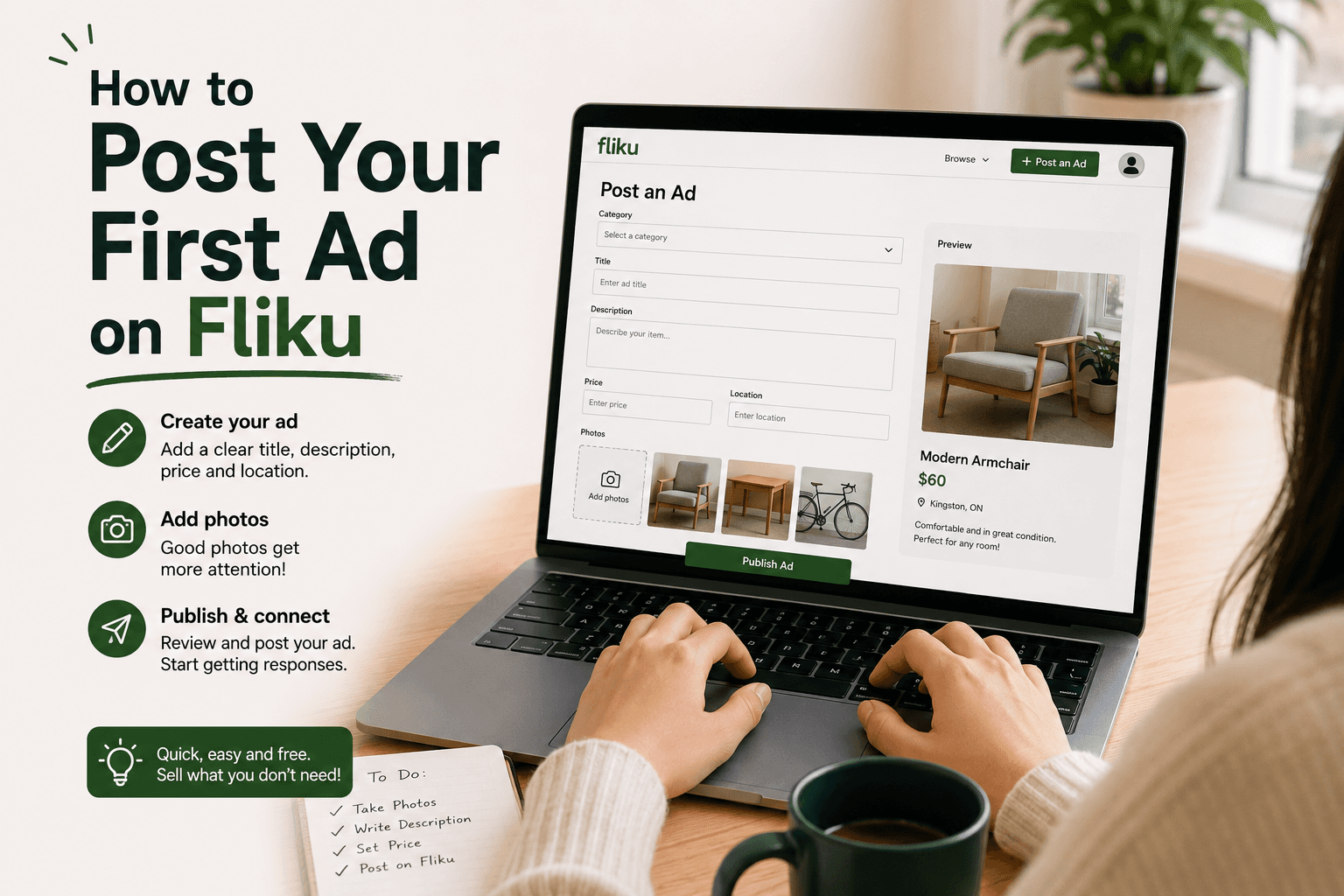
Quick Answer
Posting your first Fliku listing takes under five minutes — but the listings that sell fast do a few specific things right. Here's everything you need to know before you post.
How to Post Your First Ad on Fliku — Step-by-Step Guide
You have something to sell. You know it's worth money to someone local. You've never posted a listing before, or you've posted and had it sit with zero responses and you're wondering what you did wrong. Either way, this guide covers the complete process — not just how to click through the form, but why the specific choices you make in each field determine whether your listing generates messages in hours or sits ignored for weeks.
Posting on Fliku is free. There are no listing fees, no success fees, no commissions. What separates listings that sell from listings that don't is almost entirely the quality of the listing itself — the title, the photos, the description, and the price. This guide covers all four.
Before You Post — The Preparation That Saves Time
The sellers who get the fastest results on Fliku prepare before they open the listing form. Rushing through a listing — writing the description on the fly, pulling a random price from the air, grabbing whatever photos are easiest — produces listings that generate zero interest and then get edited two days later. The editing works, but it was avoidable.
Research the price first. Search Fliku for the same item and see what comparable listings are asking. Check what similar items have sold for on Facebook Marketplace (the "Sold" listings show recent transaction prices). Know whether your price is competitive before you commit it to the listing — changing prices after posting sometimes means your listing looks stale to people who saw it at the original price.
Take the photos before you open the form. The listing form on Fliku lets you upload photos — but if you don't have good photos ready, you'll either upload inadequate ones or abandon the session halfway through. Spend five minutes taking proper photos (see below) before you start the form. You'll upload them at the end, not improvise them mid-session.
Gather the item details. For electronics: model name, storage capacity, any included accessories, age, and known issues. For furniture: brand (IKEA model name if applicable), dimensions, material, age, and condition. For clothing: brand, size, material, and condition. Having this information ready means writing the description takes three minutes instead of ten.
Writing a Title That Gets Clicks on Fliku
The title is what buyers search for and what they see first in results. Most first-time sellers write titles that are too vague ("Nice desk," "Good condition phone") or too brief to communicate what the item actually is.
What a good Fliku title includes:
- Brand name and model — "IKEA Micke Desk" gets more clicks than "Student desk." "iPhone 13 Pro" gets more clicks than "iPhone." Buyers search for what they want specifically; your title needs to match those searches.
- Key specifications — For electronics: storage, colour, condition. "iPhone 13 Pro 256GB Sierra Blue — Excellent Condition" tells the buyer everything relevant before they click through.
- Condition signal — "Excellent," "Good," "As-Is" in the title sets expectations and filters for the right buyers. A buyer looking for a bargain clicks "As-Is" listings. A buyer who wants something pristine clicks "Excellent Condition." Matching the right buyer to your item reduces wasted conversations.
Title length: Most Fliku title fields allow 60-80 characters. Use as much of this space as you need to be specific. Truncated titles (that cut off in search results) still work — the first 40 characters are what matter.
Photos — The Most Important Part of Your Fliku Listing
Buyers decide whether to click on a listing based on the thumbnail photo before they read the title. If the thumbnail is dark, blurry, or shows the item poorly, most buyers won't click. Good photos are not optional — they're the primary driver of whether your listing generates interest.
The minimum photo set for any listing:
- One overview photo showing the complete item in good light (this becomes your thumbnail)
- One photo from a 45-degree angle showing depth
- One photo of any wear, damage, or flaws — disclosed honestly
- One photo of any important detail (brand label, screen condition, joint quality)
How to take good photos quickly: Move the item near a window and shoot during daylight. Natural light is free and dramatically better than indoor artificial lighting. Use a clean, uncluttered background — a plain wall, a clear floor. Take four photos minimum. Turn off flash. The complete photo guide is in our classified ad photo guide.
Writing a Description That Converts Browsers to Buyers
The description fills in what the photos can't show: the item's history, what's included, any flaws not visible in photos, and the practical details a buyer needs to decide. A description that answers every reasonable question before the buyer asks it reduces the number of messages you receive and increases the number of transactions you complete.
What every Fliku description should cover:
- Condition — Be specific. "Good condition" means nothing. "No visible scratches on the screen; small scuff on the back bottom corner, not visible during normal use" means everything the buyer needs to know.
- Age and use history — "Purchased August 2023, used lightly for one semester" or "Two years of regular use, always kept in a case." Context about history affects perceived value.
- What's included — List every accessory. "Includes original charger, USB-C cable, and original box" is better than "comes with stuff."
- Dimensions — For furniture, always. "78cm wide × 55cm deep × 75cm tall" is critical information for buyers who need to verify it fits their space.
- Reason for selling — Optional, but "moving out of Kingston April 30th, need it gone" creates urgency and context that buyers respond to.
- Pickup logistics — Your general area (not your exact address) and flexibility. "Available for pickup in the University District, flexible timing" helps buyers assess whether the transaction is feasible for them.
Pricing Your Fliku Listing Right
Price is the variable with the most direct impact on how fast your item sells. Too high and it sits; too low and you leave money behind.
The general rule for used items in good condition: 40-60% of current new retail price. A desk that costs $120 new at IKEA sells used on Fliku for $50-75 in good condition. A phone that costs $900 new sells used (unlocked, no damage) for $400-550 depending on age.
Research before pricing: Search Fliku for the same item. If there are three similar listings, look at how long they've been listed — old listings at a price that haven't sold tell you the market won't support that price. New listings that have sold recently tell you the price worked.
Price for the outcome you want: If you need the item gone in 48 hours (moving out, storage needed), price at the lower end of the range — you'll trade money for speed. If you have time and patience, price higher and wait for the right buyer.
Should you say "firm"? "Firm" in a Fliku listing tells buyers the price is not negotiable. This reduces contact from low-ballers but also reduces contact from people who would have paid your price after a modest negotiation. For most listings, leaving "firm" off and simply not accepting offers below your floor works better.
Choosing the Right Category on Fliku
Listing in the right category determines which buyers see your item in category searches. Buyers who browse "Furniture" on Fliku are looking for furniture — listing a desk in "Electronics" because it has a monitor stand doesn't reach the right audience.
When an item could fit multiple categories — a gaming chair could be "Furniture" or "Gaming" — list in the most specific category. A buyer searching "Gaming" who finds a gaming chair is a more qualified buyer than a general furniture browser who stumbles on it.
After You Post — Managing Your Listing
Respond to messages quickly. The first serious buyer who messages is often the buyer who buys. Delayed responses lose motivated buyers to other listings. Check messages frequently in the first 24 hours after posting — that's when interest peaks.
Refresh your listing if it's been up for a week with no interest. Most platforms boost newly refreshed listings in search results. Check if your price needs adjusting — a price reduction of 15-20% after a week of no response usually generates new interest quickly.
Mark as sold when the item is gone. Leaving sold items listed generates messages you have to respond to and wastes buyer time. Mark it sold as soon as the item leaves your hands.
Frequently Asked Questions
Is posting on Fliku free?
Yes — Fliku is completely free to post on with no listing fees and no success fees or commissions taken from your sale. You keep 100% of what the buyer pays you. Post as many listings as you need — there's no limit. This differs from platforms like Facebook Marketplace (free) and Kijiji (free basic, paid featured) — Fliku's model is consistently zero fees at every stage of the transaction.
How do I write a good Fliku listing title?
A good Fliku listing title includes: the brand name and model (e.g., "IKEA Kallax 2x4 Shelf Unit"), key specifications that buyers search for (colour, storage capacity, size), and a condition signal (Excellent, Good, As-Is). The title should be specific enough to appear in searches for the item. "Student desk" doesn't appear in any search. "IKEA Micke Desk White 73cm — Good Condition" appears when someone searches "IKEA Micke desk Kingston." Specificity in titles is what connects your listing to the buyer who is already looking for exactly what you have.
How should I price items on Fliku?
The general starting point for used items in good condition is 40-60% of the current new retail price. Research comparable listings on Fliku and check recent sold prices on Facebook Marketplace to calibrate. Items that have been listed by others for several weeks at a price haven't sold — this tells you the market won't support that price. Items that sell within days tell you the price worked. Price at the lower end of the range if you need the item gone quickly; price at the upper end if you're patient and the item is in excellent condition.
How many photos should I include in a Fliku listing?
A minimum of four photos — ideally more. The listing thumbnail is the first thing buyers see in search results; it determines whether they click. Use an overview photo in good natural light as your main image. Include all angles, any damage or wear disclosed honestly, and any important detail (brand label, screen condition, included accessories). Listings with more photos sell faster because buyers can make a decision without asking for additional images — every photo you add reduces the friction between "interested" and "messaging you."
A good Fliku listing takes about 15 minutes to prepare properly — five minutes on photos, five minutes on research, five minutes writing the description. That 15 minutes is what separates a listing that sells in 24 hours from one that gets relisted three times. Post your listing on Fliku today — it's free and your first listing is visible to Kingston buyers immediately.